Compare the exported table with the workbook so you know which values and features the recipient actually receives.
CSV exchanges one table as text; XLSX preserves an Excel workbook structure. Saving as CSV can discard formatting, charts and other workbook features, and Excel exports the active worksheet rather than bundling all sheets. The result can be valid CSV even though it no longer behaves like the original workbook.
Keep the source workbook and export a separate CSV for the intended table. Renaming that CSV with an .xlsx extension cannot recover components that were never written into it.
Compare what you need to retain
| Component | CSV | XLSX |
|---|---|---|
| Rows and columns | Text fields with delimiter, quoting and line-break rules | Structured workbook cells |
| Multiple sheets | One table; Excel exports the active sheet | Multiple worksheets in one workbook |
| Recalculating formulas | Not an active workbook formula model | Can preserve formulas and cell relationships |
| Colours, number formats and merged cells | No workbook presentation properties | Can preserve these properties |
| Charts, images and objects | Not retained as Excel objects | Can be stored in the workbook |
CSV has no intrinsic Excel font, colour or number-display setting. The importing application interprets its fields. XLSX preserves more structure, although support can still differ between spreadsheet applications.
Microsoft describes features lost in other file formats. For VBA macros, consider a macro-capable format such as XLSM; XLSX is not a complete replacement for every kind of Excel file.
A two-sheet workbook becomes one exported table
Imagine a workbook with Orders and Catalog sheets. Orders contains quantity 2, unit price 150, a multiplication formula returning 300, and a highlighted review row. Catalog contains product reference data.
With Orders active, an ordinary value-oriented Save As CSV export contains that table, including a displayed result such as 300. It does not preserve both sheets, the review colour or a recalculating workbook model. If formula display is enabled, formula text may be exported instead; that still does not make CSV a full workbook container.
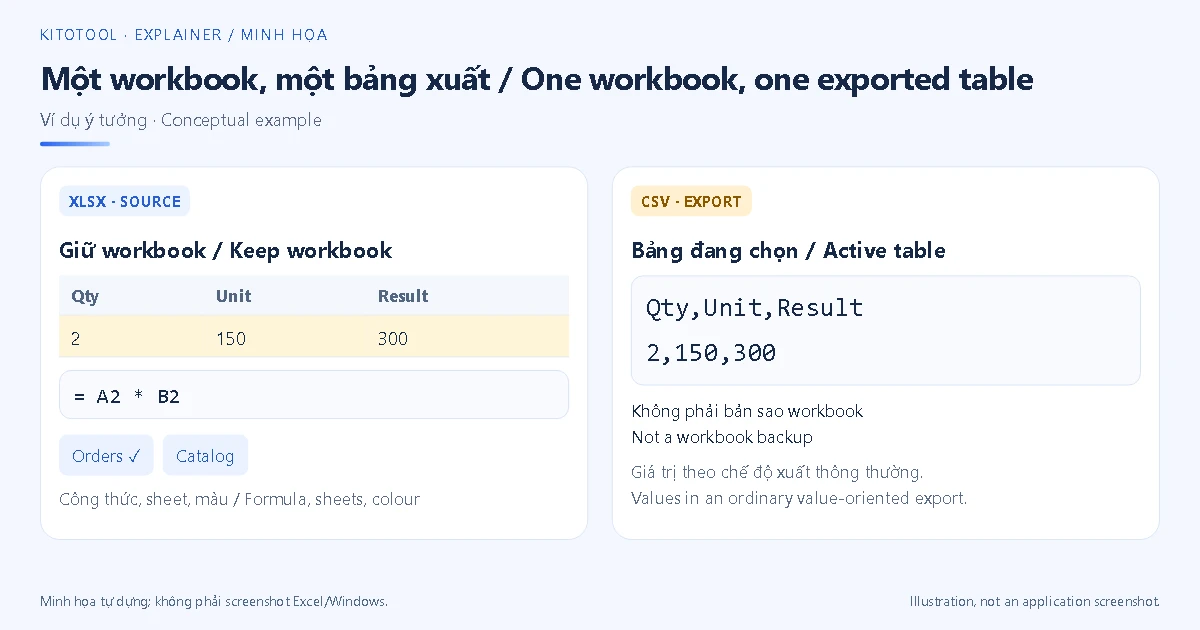
To exchange both tables as CSV, export them separately and document their relationship. To let a colleague continue working with formulas, charts and multiple sheets, retain the appropriate workbook. Microsoft’s text/CSV saving guidance explains the scope of an export.
Separate four CSV issues
Encoding controls how characters are read. Garbled accented text does not prove CSV cannot represent it. See opening UTF-8 CSV correctly in Excel.
Delimiters determine field boundaries. If a record opens in one column, inspect the actual separator and import settings. See fixing a CSV delimiter mismatch. Replacing every comma is unsafe when quoted fields contain punctuation.
Type inference happens when software imports character fields. A code such as 001234 can lose its zeros if interpreted as a number. Assign Text to identifier columns during import; see keeping leading zeros.
Values and presentation are different. Similar-looking grids do not prove equivalent formulas, reference tables or worksheet coverage. Inspect what the original cells contain and which table was actually exported.
Match the format to the recipient
Use CSV when a system requires a defined table import. Confirm encoding, delimiter, column names, date conventions and decimal notation. Fields containing separators, quotes or line breaks need the export/import workflow’s correct quoting rules; avoid constructing them by casual string concatenation.
Use XLSX when the recipient needs to continue working with a workbook. Read Excel’s conversion warning and preserve a source copy. Microsoft documents CSV import and export, but the receiving system’s requirements remain a separate check.
No dedicated KitoTool CSV ↔ XLSX converter was verified for this batch. For a read-only handoff, export a PDF from Excel and inspect the layout; the missing-columns guide covers that task. A PDF is not a substitute for machine-importable table data.
Reopen the export before sending it
Keep the workbook, confirm the active sheet and save a separate export. Open it using the recipient’s intended workflow. Compare row counts, headers, leading-zero codes, accented text, decimal values and representative dates with the source.
In the sample, the CSV should preserve the intended order row and result 300, while Catalog and working formulas remain in the original workbook. If only the CSV survives, you can rebuild a table from its remaining fields; it cannot automatically restore absent sheets, charts or colours.