
Check the formula bar and column width before retyping anything; then investigate negative date or time results.
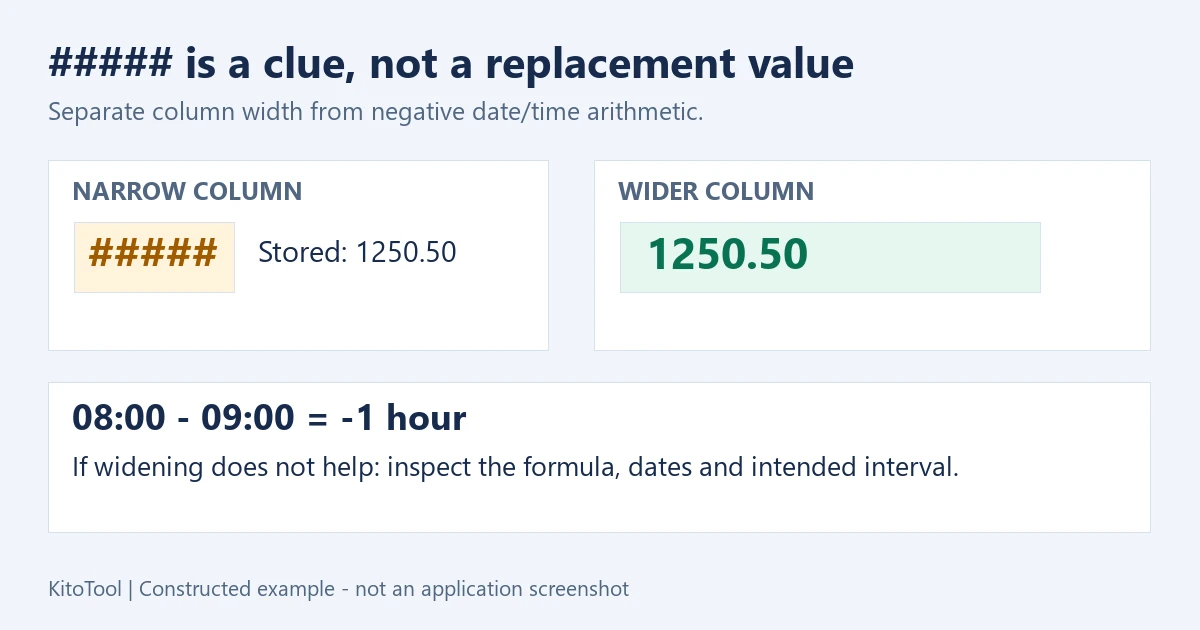
You are checking a report before sending it, and an amount has turned into #####. Do not retype the number yet. Hash marks usually indicate a display problem; they do not, by themselves, prove that the stored value has disappeared. Start by separating a narrow column from a negative date or time result.
Select the cell, inspect the formula bar and widen that one column. This gives you a useful first answer without changing the evidence.
Widen the column before changing the number
In desktop Excel, point to the right edge of the column heading, such as the boundary between B and C. Drag it right, or double-click the boundary to try AutoFit. Merged cells and unusual layouts may need a manual width adjustment.
If the number returns, the width was the problem. Replacing the hashes with a number from memory could overwrite a correct formula. Microsoft identifies insufficient width and negative date/time values as common causes.
Try this small example in an empty worksheet. It is an exercise, not an Excel screenshot:
| Action | What to inspect | Change the stored value? |
|---|---|---|
| Enter 1250.5, choose Number with two decimal places, then make the column very narrow | The cell may show hashes; decimal punctuation follows your settings | No |
| Widen the same column | The amount becomes readable, for example 1250.50 | No |
| Compare the formula bar before and after | The value or formula stays the same | No |
The number of hash marks is not the number of missing digits. It depends on the available display space.
Still seeing hashes? Check the meaning of the time result
Suppose a timesheet records a 09:00 start and an 08:00 finish on the same date. Finish minus start is negative. Under the usual 1900 date system, some date/time formats cannot display that result and may show hashes.
In a spare cell, =TIME(8,0,0)-TIME(9,0,0) represents minus one hour. If your installation uses semicolon argument separators, use =TIME(8;0;0)-TIME(9;0;0). This is a diagnostic example, not a universal timesheet repair formula.
On a copy or in a helper cell, temporarily use General or Number to inspect the sign. A result of approximately -0.0416667 is minus one twenty-fourth of a day. Finding that negative value tells you where to investigate; it does not establish which business rule is correct.
Ask whether the finish time was mistyped, the subtraction references are reversed, or the shift actually crosses midnight. Also check whether the cells contain full dates and times or only times of day.
For a genuine overnight shift, recording both the start and finish date and time usually makes the intended interval clearer. Applying ABS to every negative result can hide a reversed entry. Adding a day to every negative value can conceal a different input error. Establish what happened before choosing either approach.
Leave the workbook’s date system alone while diagnosing one cell
You may find advice to switch to the 1904 system. Avoid using that as the first experiment on a shared workbook. Microsoft documents a 1,462-day difference between the two date systems.
A change at that level needs a review of the workbook and its date data. Making one cell readable is not sufficient evidence that every other date still means what it should.
Reducing displayed decimal places can make a column fit, but choose it as a deliberate reporting decision. Do not hide precision that the recipient needs merely to make a warning disappear.
Check the saved report, not just the repaired cell
Compare one affected cell, a neighbouring value and a relevant total against the original. Inspect formulas as well as the visible amounts. A width-only change should not alter stored values or formulas.
Then inspect Print Preview or the actual exported PDF. If columns move onto another page, use the separate guide to Excel PDFs that cut off columns. If the numbers are visible but the total is incomplete, investigate numbers stored as text instead.
You can download the narrow-column and negative-time workbook and try it in Excel. It contains constructed examples and no macros; rendering depends on the spreadsheet application.
Hash marks can make a finished report feel suddenly unreliable. Let the formula bar and one careful width adjustment tell you what is wrong before you change the work underneath.